Jazz Ride Drum Pattern
Ride on 8 steps, hi-hat foot on 2 and 4. 140 BPM, 4/4.
Tap any square to add or remove a hit: the notation under the grid follows. Tap a row name to hear that drum. Share this beat sends your speed and your edits.
Drum machine: mute a drum, swing, count-in, speed up, MIDI
Next moves
What makes this pattern tick
A sequencer you can play, slow down and rebuild, with the same bar written in standard notation under it. Original groove — nothing here is transcribed from a record.
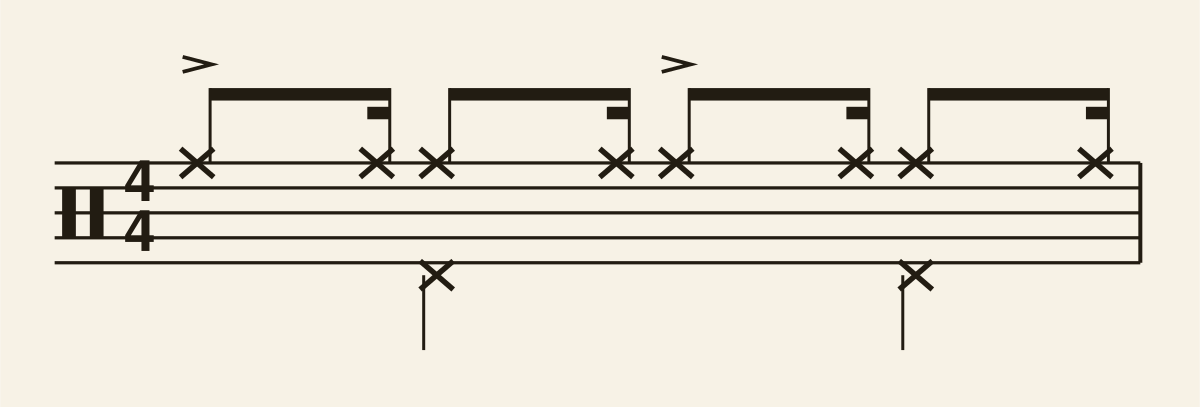
This is the jazz time feel: a ride cymbal playing quarter notes (crotchets) with an extra swung note before each one, and the left foot closing the hi-hat on 2 and 4. Like the shuffle it is really a triplet figure, written here on the "a" of each beat — swing it by ear rather than reading it squarely. There is deliberately no kick pattern: in jazz the bass drum either stays silent or "feathers" quarter notes so quietly you feel it rather than hear it.
What each drum plays
Read the notation from the top down: cymbals above the staff, drums inside it, feet underneath. Full details in the drum notation guide.
| Voice | Hits | Where in the bar |
|---|---|---|
| Ride cymbal | 8 | 1, the "a" of 1, 2, the "a" of 2, 3, the "a" of 3, 4, the "a" of 4 |
| Hi-hat pedal (foot) | 2 | 2, 4 |
How to count it
Count 1 e & a 2 e & a 3 e & a 4 e & a out loud, one syllable per grid step. The numbers are the 4 beats, “&” is halfway through a beat, and “e” and “a” are the sixteenths either side of it. Every note in this pattern lands on one of those syllables — if you can say the count while you play, you are not guessing.
The count row along the top of the grid highlights the syllable you are on as the loop plays, so you can check your counting against the playhead rather than against your ears.
Suggested tempo progression
This pattern is written for 140 BPM and rated intermediate. Work up in stages rather than jumping straight to the target — the player remembers whatever tempo you leave it at, and Speed up in the drum machine adds 5 BPM every four bars for you.
- 85 BPM — slow enough to watch every limb. Play it until nothing surprises you.
- 110 BPM — where the groove starts to feel like music rather than an exercise.
- 140 BPM — the working tempo. Hold it for two minutes without drifting.
- 160 BPM — faster than you need, so the target tempo feels easy when you come back to it.
Learn it in four loops
- Hands only. Loop it at 110 BPM and play just the cymbal part (Play only: Hands in the drum machine).
- Add the snare. Same tempo. Keep the cymbal steady while the snare lands.
- Add the feet. Kick and hi-hat pedal last. If it falls apart, drop 10 BPM.
- Speed up. Nudge up 5 BPM at a time to 140 BPM. Then try Stand mode and play with the phone on the kit.
Make it your own
The grid above is a copy, not the original, so change anything you like — toggle cells on and off, mute a voice to hear what it was holding together, or play the feet only to check your foot. Reset edits puts the pattern back, and Share this beat sends your version, at your speed. If you want the same idea in a different style, the closest neighbors are Blues Shuffle Drum Pattern and Reggae Drum Pattern, or browse all 20 patterns.
Two more controls for producers: Swing pushes every off-beat late for a shuffled or hip-hop feel, and Download MIDI saves four bars of exactly what is on the grid — your edits, accents, tempo and swing — as a General MIDI drum file you can drop into any DAW.
Questions
What tempo is the jazz ride pattern?
Around 140 BPM is typical. Start 20 BPM slower and build up once every hit lands with the click.
How do I count the jazz ride pattern?
Count “1 e & a 2 e & a 3 e & a 4 e & a”: sixteen steps per bar, four per beat.
How is the jazz ride pattern written in drum notation?
Under the grid, the same beat is written on the staff (stave): cymbals as x noteheads above the staff, the snare in the third space and the kick in the bottom space. Hands have stems up, feet have stems down, and a rest shows where a voice is silent.
Drum pattern data last updated . Every diagram here, in the printable PDF and in the chart image comes from one dataset, so the paper and the screen cannot disagree.